01
One keyboard, Typst output
Basic, Pure Math, Statistics, Physics, Chemistry, and Graphing modes insert notation directly as Typst. The same keys serialize to LaTeX in a LaTeX document, so nothing has to be relearned if you switch formats.
MATH Keys is a free Typst editor in the browser: a click-to-insert STEM keyboard, a live PDF preview, and AI Fix on the compile log. Typst↔LaTeX conversion is on Plus and Pro for the day a journal asks for .tex. No install, no TeX distribution.
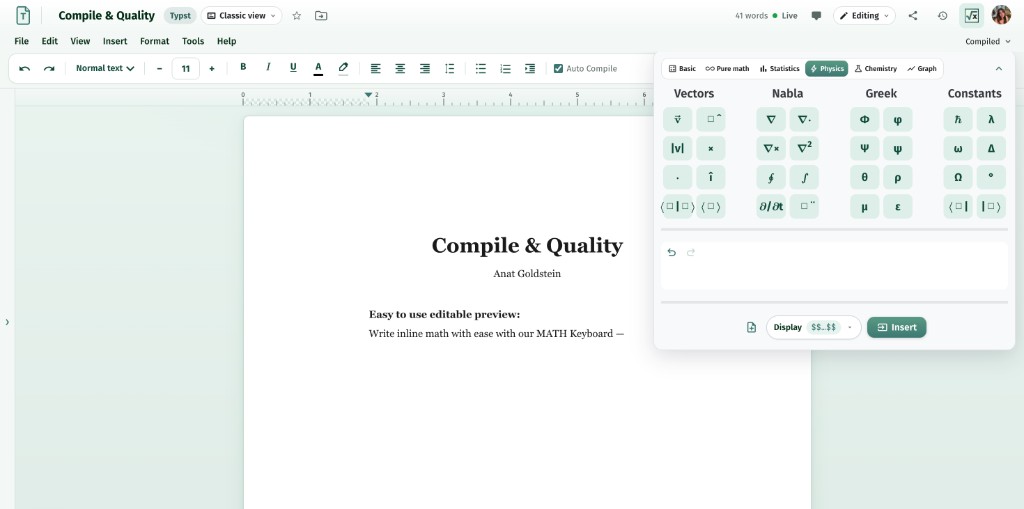
MATH Keys is a free online Typst editor. Typst is a modern typesetting language: you write plain-text markup and get a PDF, much like LaTeX, but with cleaner syntax and a fast preview. For most STEM homework, lecture notes, and lab reports it reaches a finished PDF with far less ceremony than a TeX preamble.
A six-mode STEM keyboard inserts notation so you do not have to recall markup, the document previews in the browser and compiles on the server for the authoritative PDF, AI Fix explains failures from the log, and Math Drive keeps documents, figures, and shared source files together. Free includes 3 Typst and 3 LaTeX documents — unlimited on Plus at $4.99/month — and Plus/Pro convert the same document between formats when you need it.
Typst removes the preamble. The keyboard, the live PDF, and AI Fix remove the rest of the friction.
01
Basic, Pure Math, Statistics, Physics, Chemistry, and Graphing modes insert notation directly as Typst. The same keys serialize to LaTeX in a LaTeX document, so nothing has to be relearned if you switch formats.
02
A WebAssembly engine renders the preview in the browser while the server compile produces the authoritative PDF. You see changes immediately and still ship a PDF that was built properly.
03
When a compile fails, AI Fix reads the log, explains the problem in plain language, and proposes the edit as a diff. You accept or reject it — nothing is rewritten behind your back.
04
Draw a molecule on the structure canvas or plot in Cartesian, polar, or 3D, then place the result in your document as a figure instead of hand-writing figure code.
05
Folders, search, starring, and extra files per document, including files imported from another document. Share as editor, commenter, or viewer, co-edit live with presence, and roll back through version history.
06
Choosing Typst does not lock you out of .tex. Free includes 3 editable LaTeX documents; Plus adds 10 Typst→LaTeX conversions a month and Pro is unlimited.
No binary to download, no preamble to copy from a forum.
Step 01
Sign in with Google or an email address, then create a document in Math Drive. Typst documents are included on the free plan.
Step 02
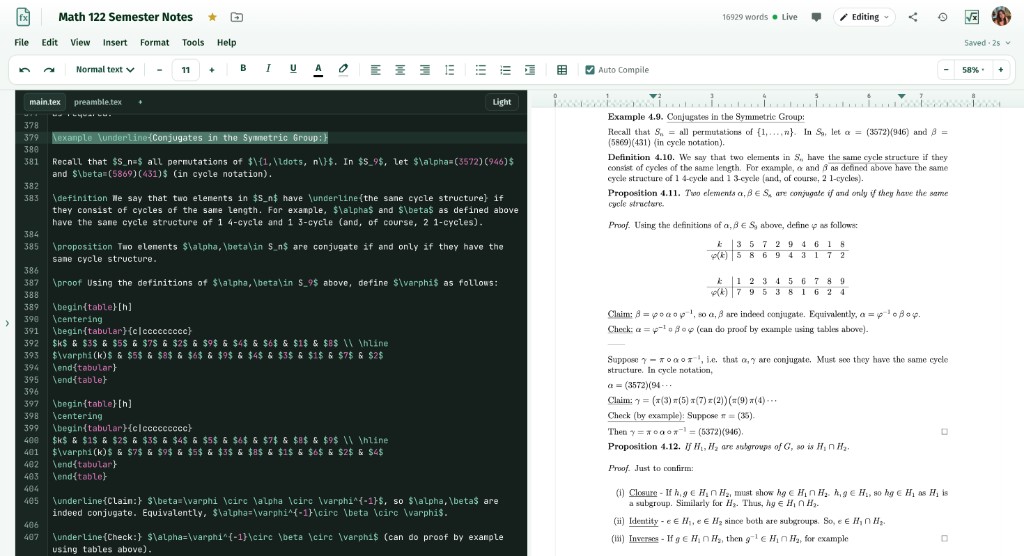
Type prose normally and click the STEM keyboard for notation — it inserts Typst markup. Switch modes for statistics, physics, chemistry, or graphing as the document needs them.
Step 03
Watch the browser preview as you type, compile for the authoritative PDF, use AI Fix if it fails, then download the PDF or export the document to LaTeX.
The language is the same. What differs is how notation gets in and what you can do with the file afterwards.
| Feature | MATH Keys | A plain Typst editor | LaTeX workflow |
|---|---|---|---|
| Entering notation | Six-mode STEM keyboard, click to insert | Type the markup yourself | Type the commands yourself |
| Preview | Browser preview plus server compile | Live preview | Server or local compile |
| Setup | Nothing to install | Nothing to install, or a local binary | A TeX distribution or a hosted account |
| When a compile fails | AI Fix explains the log and edits | Compile log | Compile log |
| Chemistry structures | Draw on a canvas → figure or markup | Write the markup yourself | Write chemfig / mhchem yourself |
| Graphs and plots | Cartesian, polar, 3D → image or TikZ | Write the plotting code | Write TikZ or pgfplots |
| Convert to LaTeX | Typst↔LaTeX conversion in the editor | Not built in | Already LaTeX |
| Equations in Google Docs | Free Chrome extension | Not included | Not included |
| Free tier | 3 Typst and 3 LaTeX documents, keyboard, live PDF | Varies by tool | Varies by host |
Rows describe what MATH Keys ships in the box; other tools change quickly, so check their current feature list before you decide.
Typst suits people who want the PDF, not the preamble.
You want equations to look right without learning a TeX preamble first. Typst syntax is shorter, and the keyboard writes the parts you would otherwise look up.
Five free documents, a live PDF, and a keyboard that covers calculus, statistics, physics, and chemistry — enough to finish tonight's problem set.
Fast preview for worksheets and notes, shared files for boilerplate, and sharing by link with editor, commenter, or viewer roles.
Write in Typst now and export to LaTeX when a journal, professor, or template asks for it — Plus and Pro keep the converted source editable.
Q1
A Typst editor is software for writing documents in Typst, a modern typesetting language that compiles to PDF. MATH Keys is a free online Typst editor: the STEM keyboard writes the markup, a live PDF previews as you type, and you can export to LaTeX when a template requires .tex.
Q2
Typst is a modern typesetting language for documents with maths, figures, and citations. You write plain-text markup and get a PDF, like LaTeX, but the syntax is shorter and the preview is fast. It is a practical default for homework, lecture notes, and lab reports that do not require a specific LaTeX template.
Q3
Yes. The MATH Keys free plan includes 3 Typst and 3 LaTeX documents with the STEM keyboard, a live compiled PDF, limited AI Fix, and 7-day version history. Plus at $4.99/month makes documents unlimited and adds Typst→LaTeX conversion.
Q4
No. MATH Keys previews Typst in the browser and compiles it on the server, so there is no binary or package manager to install and nothing to configure again on another computer.
Q5
Use Typst when you control the format: the syntax is shorter, the preview is faster, and there is no preamble to maintain. Use LaTeX when something external requires it — a journal template, a lab's class file, or a professor who asks for .tex. In MATH Keys you can start in Typst and export to LaTeX later instead of choosing once at the beginning.
Q6
Yes. The editor has a Typst↔LaTeX conversion wizard, so it also works in the other direction if you start from .tex. Conversion is on Plus (10/month) and Pro (unlimited).
Q7
Yes. The same six-mode STEM keyboard serializes to whichever format the document uses — Typst notation in a Typst document, LaTeX in a LaTeX document — so switching formats does not mean relearning the keys.
Q8
Yes. Live co-editing with presence, comments, and suggestions all work on Typst documents. Free includes one editor per document, Plus allows three, and Pro is unlimited.
Q9
Typst handles long structured documents with maths, figures, tables, and bibliographies. The constraint is usually the submission requirement rather than the language: if a publisher demands LaTeX source, write in Typst and convert to LaTeX on Plus or Pro, or start in the LaTeX editor — Free includes 3 documents of each.
Q10
You get the compile log in the editor, and AI Fix can read it for you — it explains the failure in plain language and proposes the edit as a diff you accept or reject.
Create an account, insert notation with the keyboard, and watch the PDF build as you type. Export to LaTeX whenever something outside asks for it.