Skip to content
Online LaTeX editor

LaTeX editor online type math with keys, not syntax

MATH Keys compiles LaTeX in your browser with a click-to-insert STEM keyboard, a live PDF beside your source, and AI Fix that reads the compile log for you. No TeX distribution, no package manager, no template hunting.

  • Nothing to install — compiling runs on our servers, not your laptop
  • Six keyboard modes write the LaTeX for integrals, matrices, and cases
  • Real pdflatex output with logs, plus AI Fix in plain language
  • Chemistry structures and 2D/3D plots export as chemfig, mhchem, or TikZ
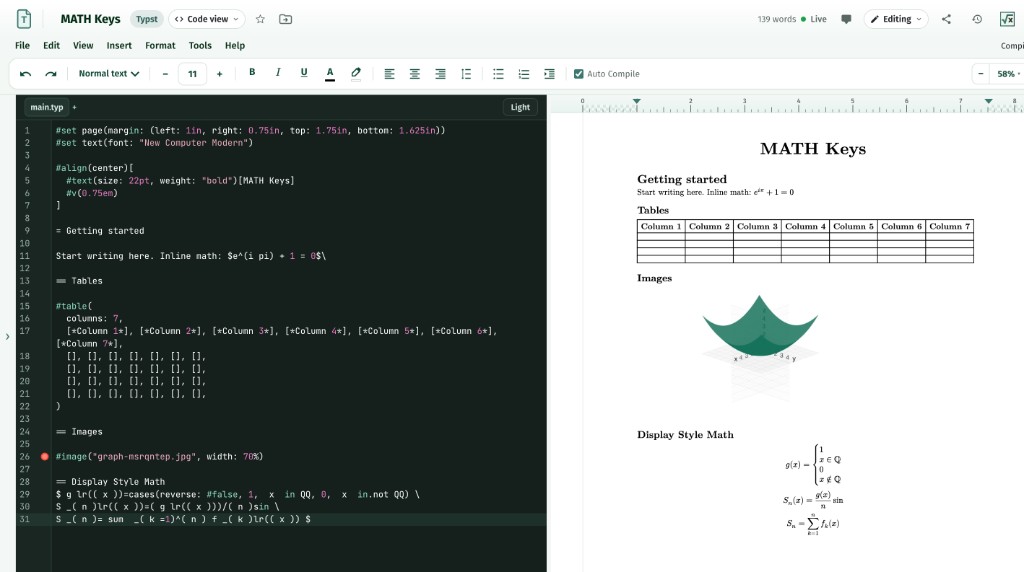
MATH Keys online LaTeX editor: source on the left, live compiled PDF with display math, a table, and a 3D plot on the right
Source and live PDF
01The short answer

What MATH Keys is, in one paragraph

MATH Keys is an online LaTeX editor with an on-screen STEM keyboard. You click a symbol instead of remembering its command, the document compiles to a real PDF next to your source, and when a compile fails AI Fix explains the log and proposes the correction. Everything runs in the browser, so there is no TeX distribution to install and nothing to reinstall on a new machine.

Free accounts include 3 Typst and 3 editable LaTeX documents with the same keyboard and the same live PDF. Plus at $4.99/month and Pro at $9.99/month unlock unlimited documents, and the free Chrome extension copies LaTeX or an image of any equation into Google Docs, Slides, Word, PowerPoint, Keynote, and Gmail.

Category
Online LaTeX and Typst editor with a math keyboard
Runs in
Any modern browser — Chrome, Safari, Firefox, Edge
Install
None. No TeX distribution, no local packages
Math input
Six-mode STEM keyboard, click to insert
Output
Real PDF from pdflatex, with readable compile logs
Error help
AI Fix reads the log and suggests the change
Free plan
Typst documents, live PDF, keyboard, limited AI Fix
Editable LaTeX
Plus $4.99/mo · Pro $9.99/mo · yearly saves 2 months
Collaboration
Live co-editing, comments, and version history by plan
Elsewhere
Free Chrome extension for Docs, Slides, Word, and Gmail
02What you get

Why writers move their LaTeX here

The parts of LaTeX that cost you evenings — setup, symbol recall, and cryptic errors — are the parts we replaced.

01

A keyboard for the commands

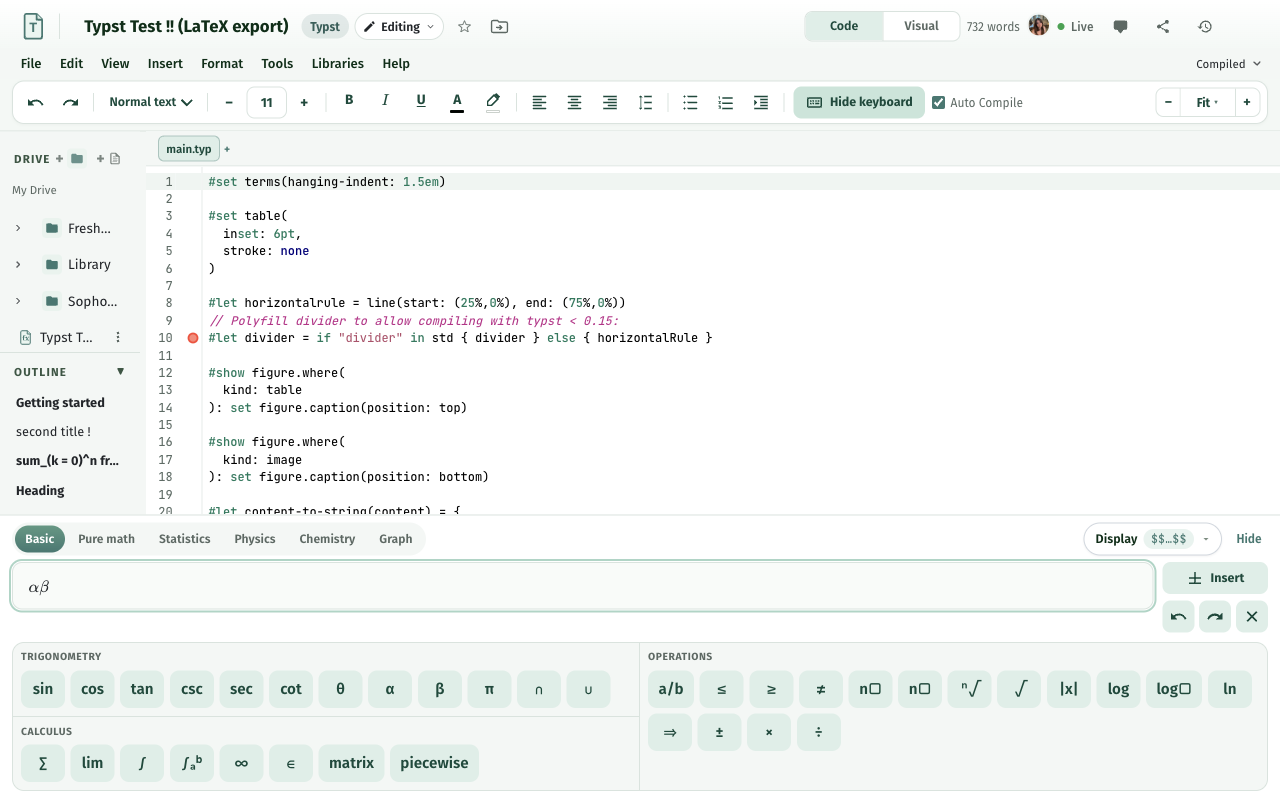
Basic, Pure Math, Statistics, Physics, Chemistry, and Graphing modes put integrals, matrices, piecewise cases, nabla, and bra-ket notation one tap away. The keyboard writes the markup, so you learn syntax by reading it rather than memorising it first.

02

Live PDF from a real compile

Documents compile with pdflatex on our workers and render through PDF.js beside the source. Click text in the PDF to jump back to the line that produced it, and read the full log instead of guessing which package failed.

03

AI Fix instead of log archaeology

A missing brace or an undefined control sequence should not cost an evening. AI Fix reads the compile log, explains the failure in plain language, and offers the edit as a diff you accept or reject.

04

Chemistry and plots without hand-written markup

Draw a molecule on the structure canvas and drop it in as chemfig or mhchem. Plot in Cartesian, polar, or 3D and export the figure as an image or TikZ — no separate tool, no pgfplots syntax to look up.

05

Math Drive, sharing, and history

Folders, search, starring, and files imported from another document keep a whole course in one place. Share as editor, commenter, or viewer, co-edit live with presence, leave comments, and roll back through version history.

06

3 Typst and 3 LaTeX free

Start with 3 Typst and 3 LaTeX documents. Convert between formats on Plus (10/month) or Pro (unlimited) when a journal, lab, or professor asks for .tex.

The MATH Keys mint STEM keyboard with an equation field, inserting LaTeX notation
STEM keyboard — Basic mode
03How to start

From blank page to compiled PDF in three steps

No download, no template repository, no local build chain.

Step 01

Open the editor

Sign in with Google or an email address and create a document in Math Drive. There is nothing to install and no TeX distribution to configure.

Step 02

Write with the keyboard

Type prose normally and click the STEM keyboard for notation. Switch modes for statistics, physics, chemistry, or graphing, and save any snippet you repeat as a custom key.

Step 03

Compile, fix, and share

Compile to a live PDF, send failures to AI Fix, then download the PDF or invite collaborators as editors, commenters, or viewers.

04Compared

Three ways to write LaTeX today

A keyboard-first editor, a plain hosted TeX editor, and a local TeX distribution all produce a PDF. They differ in what you set up and how notation gets in.

Three ways to write LaTeX today
FeatureMATH KeysA plain hosted TeX editorA local TeX install
Getting startedSign in and typeSign in and typeInstall a multi-gigabyte distribution
Entering notationSix-mode STEM keyboard, click to insertType the commands yourselfType the commands yourself
PDF previewLive PDF from a server compileLive PDF from a server compileLocal build at your machine's speed
When a compile failsAI Fix explains the log and editsCompile log and documentationCompile log and a web search
Chemistry structuresDraw on a canvas → chemfig / mhchemWrite the markup yourselfWrite the markup yourself
Graphs and plotsCartesian, polar, 3D → image or TikZWrite TikZ or pgfplots yourselfWrite TikZ or pgfplots yourself
Typst in the same editorYes, with Typst↔LaTeX conversionUsually not includedA separate install
Equations in Google DocsFree Chrome extensionNot includedNot included
Free tierTypst documents, keyboard, live PDFVaries by hostFree, but you maintain it

The right-hand columns describe the common setup rather than one specific product; tools change quickly, so check the current feature list and pricing before you decide.

05Who it is for

Who this editor is for

Written for people whose deadline is the document, not the toolchain.

Students

Problem sets with real notation, without spending the first night on a TeX install. Start free with 3 Typst and 3 LaTeX documents; upgrade when a course needs more.

Teachers

Worksheets, exams, and keys built from shared boilerplate files, then shared with a link. Chemistry and plots come from the same keyboard.

Researchers

Editable LaTeX for journal and lab templates, live collaboration with comments and suggestions, and version history when a co-author disagrees.

Anyone writing in Docs or Word

The free Chrome extension is the same keyboard: build the equation, then copy it as an image or LaTeX into Google Docs, Slides, Word, PowerPoint, Keynote, or Gmail.

06Questions

LaTeX questions, answered directly

Q1

What is a LaTeX editor?

A LaTeX editor is software for writing documents in LaTeX — the markup language used for papers, problem sets, and books that need precise mathematics. MATH Keys is an online LaTeX editor: a STEM keyboard inserts the commands, a live PDF shows the compile, and AI Fix explains errors, with no TeX distribution to install.

Q2

Is there a free online LaTeX editor?

MATH Keys has a free plan that covers the whole writing loop: 3 Typst and 3 LaTeX documents, the STEM keyboard, a live compiled PDF, and limited AI Fix. Plus at $4.99/month makes documents unlimited and adds Typst→LaTeX conversion. The Chrome extension, which copies equations as LaTeX or images into Google Docs and Word, is free forever.

Q3

Do I need to install LaTeX or a TeX distribution?

No. Compiling happens on our servers, so a browser is the only requirement. Nothing to install on a laptop, a lab machine, or a Chromebook, and nothing to set up again when you switch computers.

Q4

How is this different from other online LaTeX editors?

Most hosted editors give you a source pane, a compile button, and a PDF. MATH Keys adds the input layer on top of that: a six-mode STEM keyboard so you click notation instead of recalling commands, AI Fix that reads the compile log and proposes the edit, a chemistry canvas that exports chemfig or mhchem, graphing that exports TikZ, and Typst in the same editor with Typst↔LaTeX conversion.

Q5

Can I write LaTeX without knowing the commands?

Yes. The keyboard inserts the markup for integrals, sums, matrices, piecewise cases, vectors, distributions, and chemistry, and you can save any snippet you type often as a custom key. Because the inserted source stays visible, most people pick up the syntax by reading their own document.

Q6

How do I fix a LaTeX compile error?

Open the compile log in the editor, or send it to AI Fix. AI Fix reads the log, explains what broke in plain language — a missing brace, an undefined control sequence, a package that was never loaded — and offers the correction as a diff you can accept or reject.

Q7

Can I put LaTeX equations in Google Docs or Word?

Yes, with the free MATH Keys Chrome extension. Build the equation on the same STEM keyboard, then copy it as an image or as LaTeX and paste it into Google Docs, Slides, Word, PowerPoint, Keynote, or Gmail.

Q8

Does it support chemistry packages and TikZ plots?

Yes. Chemistry mode includes a structure canvas that exports as an image or as chemfig / mhchem markup, and graphing mode plots in Cartesian, polar, and 3D and exports the figure as an image or TikZ.

Q9

Can I collaborate on a LaTeX document?

Yes. Documents support live co-editing with presence, comments, and suggestions you accept or reject. Free includes one editor per document, Plus allows three, and Pro is unlimited. Version history is 7 days on Free and unlimited on paid plans.

Q10

Can I download the PDF and keep my source?

Yes. Compiled PDFs download from the editor, and your document source stays yours — LaTeX on Plus and Pro, or Typst with an export to LaTeX if you need .tex elsewhere.

Get started

Open a LaTeX document and compile it in the next five minutes

Create an account, write with the keyboard, and watch the PDF appear. Start free with 3 Typst and 3 LaTeX documents, or go unlimited on Plus at $4.99/month.